What is a STEP File? A Practical Guide to Its Definition and Applications
By JunWen Liu | Apr. 1, 2026
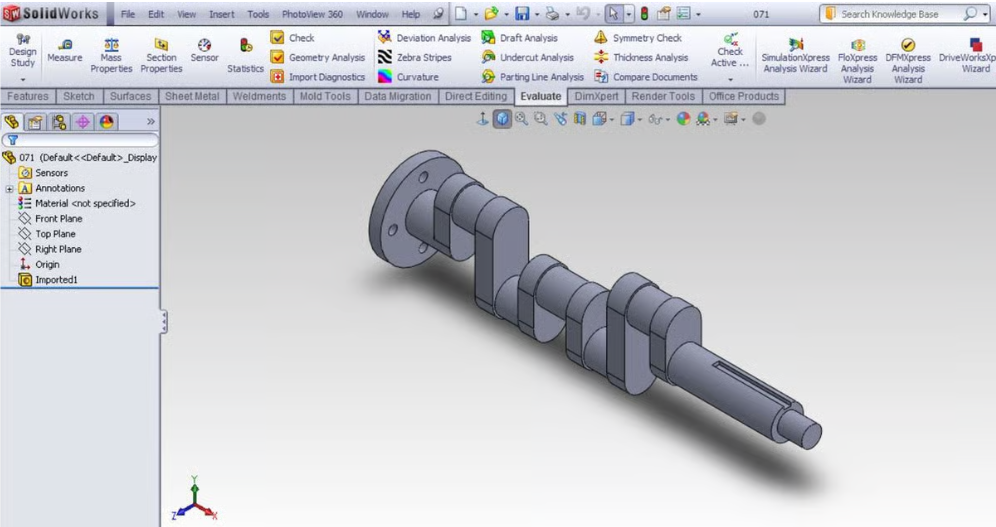

When it comes to precision parts, the geometric structure and precise parameters are the most critical components of any technical drawing—they determine the success of the final product. If you have ever been involved in part design or manufacturing, you have undoubtedly encountered the STEP file.
Think of it this way: just as a Word document captures text, and Excel organizes data in tables, a STEP file represents the 3D model of a part. It houses every intricate detail of a part’s geometry and specific surface data, allowing it to be viewed and edited across multiple software platforms.
At VMT CNC Machining Factory, our engineering team is highly proficient in using STEP files for the preparatory stages of CNC machining. We use CAD-modeled STEP files to streamline CAM programming, ensuring our cutting tools follow the exact paths your design requires. Alternatively, if your project involves metal 3D printing, the STEP file serves as the essential high-fidelity source that can be converted into an STL file for the printing process.
Technically categorized under ISO 10303, STEP files are most commonly identified by two interchangeable file extensions:
Both extensions represent the exact same data structure. Whether you save your file as .stp or .step, any modern CAD program will recognize it identically.
Additionally, there are a few names that not frequently used; below table summarizes all its equal names:
| Category | Name | Notes |
| Common Names | STEP File | The standard acronym (Standard for the Exchange of Product Data). |
| STP File | The most common 3-letter file extension (.stp). | |
| Formal Titles | ISO 10303 | The official International Standard number. |
| Standard for the Exchange of Product Model Data | The full, formal name of the ISO standard. | |
| Technical Terms | Part 21 File (P21) | Refers to the specific “clear text encoding” used in the file. |
| Neutral CAD Format | A general term for software-independent files like STEP. | |
| Version Types (AP) | AP203 | Often called “Configuration Controlled 3D Design.” |
| AP214 | Known as “Automotive Design” (includes colors/layers). | |
| AP242 | “Managed Model-Based 3D Engineering” (the modern standard). | |
| Rare Extensions | .ste / .stpz | Less common variations or compressed (zipped) STEP files. |
The greatest strength of the STEP format is its interoperability, and it is universal to lots of software:
| Category | Recommended Software | Notes |
| Professional CAD | SolidWorks, Autodesk Inventor, CATIA, Rhino 3D | Fully support STEP with exact NURBS geometry and assembly structures. |
| Free/Open Source | Fusion 360 (Personal), FreeCAD | Fusion 360 and FreeCAD handle STEP files natively as solid geometry. |
| Blender | Note: Blender cannot open STEP files natively. You must use a plugin (like STEPper) or convert it to a mesh (STL/OBJ) first. | |
| Viewers & Analyzers | NIST STEP File Analyzer & Viewer | Excellent for checking file syntax, PMI data, and geometric tolerances. |
| ShareCAD / Online Viewers | Useful for quick browser-based viewing without installing software. | |
| Adobe Acrobat (Pro) | Can view 3D content, but modern versions often require converting STEP to U3D or PRC formats first to create a 3D PDF. |

Why do we prefer STEP files at VMT for preparation of CNC Machining ?
Converting a STEP file to the other is generally a straightforward process. Most modern 3D design platforms handle this through the “Save As” or “Export” functions. For CNC machining preparation, this conversion typically happens within CAD software (like SolidWorks, Fusion 360, or AutoCAD) where the original 3D model is refined.
Why Convert to Other Formats?
While a STEP file is the best format for 3D data exchange, you may need to convert it into other formats for specific manufacturing processes:
Noting: The Risk of Data Loss
While converting files seems quite easy and convenient, it is important to understand that not all formats are created equal, especially for detailed data of the STEP file.
Moving from a STEP file (a parametric model) to a STL file (a mesh model) is a non-reversible operation. A STEP file contains mathematically defined curves and surfaces, providing 100% precision. When you convert it to an STL, the software simplifies those smooth curves into thousands of tiny flat triangles (a mesh).
Once a STEP file is saved as an STL, it becomes incredibly difficult to modify specific features—such as changing the radius of a drilled hole—with the same surgical precision you had in the original STEP file. Always keep your original STEP files as your “Master Source” before exporting to mesh formats.
If you are looking to master 3D design for manufacturing, several great resources are available:
The STEP file is the universal showcase for precision parts, and it provides a clear communication between designers and manufacturers, ensuring that what you see on your screen is exactly what we produce in our factory.
Ready to bring your project next step?
If you require custom CNC machined parts, you can send your 3D models or just 2D drawings to us. Our VMT CNC Machining Factory engineering team will help review your drawings for manufacturability, optimizing your STEP files for maximum precision and cost-efficiency, and promoting fast production.

 WhatsApp/WeChat/Mobile:
+86-15099911516
WhatsApp/WeChat/Mobile:
+86-15099911516 Tel: 86-150-9991-1516
 QQ: 939020977
 E-Mail: service@vimetal.com.cn


Who created the STEP file format and when?
It was developed by the ISO (International Organization for Standardization) and first released in 1994 to provide a neutral format for sharing 3D data.
What program will open a STEP file?
Almost any 3D software can open them, including SolidWorks, AutoCAD, Fusion 360, and FreeCAD.
What is the difference between STL and STEP files?
What is the difference between STP and STEP files?
There is no difference; they are the same format. The three-letter .stp extension was originally popularized by older Windows file systems.
Can I convert a STEP file to DWG?
Yes. Most CAD software allows you to export a “Flat Pattern” or a “2D Drawing” from a 3D STEP file into a 2D DWG format for laser cutting or documentation.